
Hoard Sweeper Not Loading? How to Fix the Loading Screen
Last updated: November 27, 2026 · By the Hoard Sweeper fan site · Game by Jungle Pixel Studio
If the game is stuck on the loading screen, first let the download finish, then make sure your browser can run WebGL 2. It is a 3D game, so the first load on a slow connection can take a minute or more. Later visits are usually much faster because the browser keeps the files in its cache. You can play on the homepage and come back here if it does not start. Stopping at floor 3 after the game is already running is the free limit from update 1.6, not a failed download. That split is explained on the Steam and Supporter Pack page.
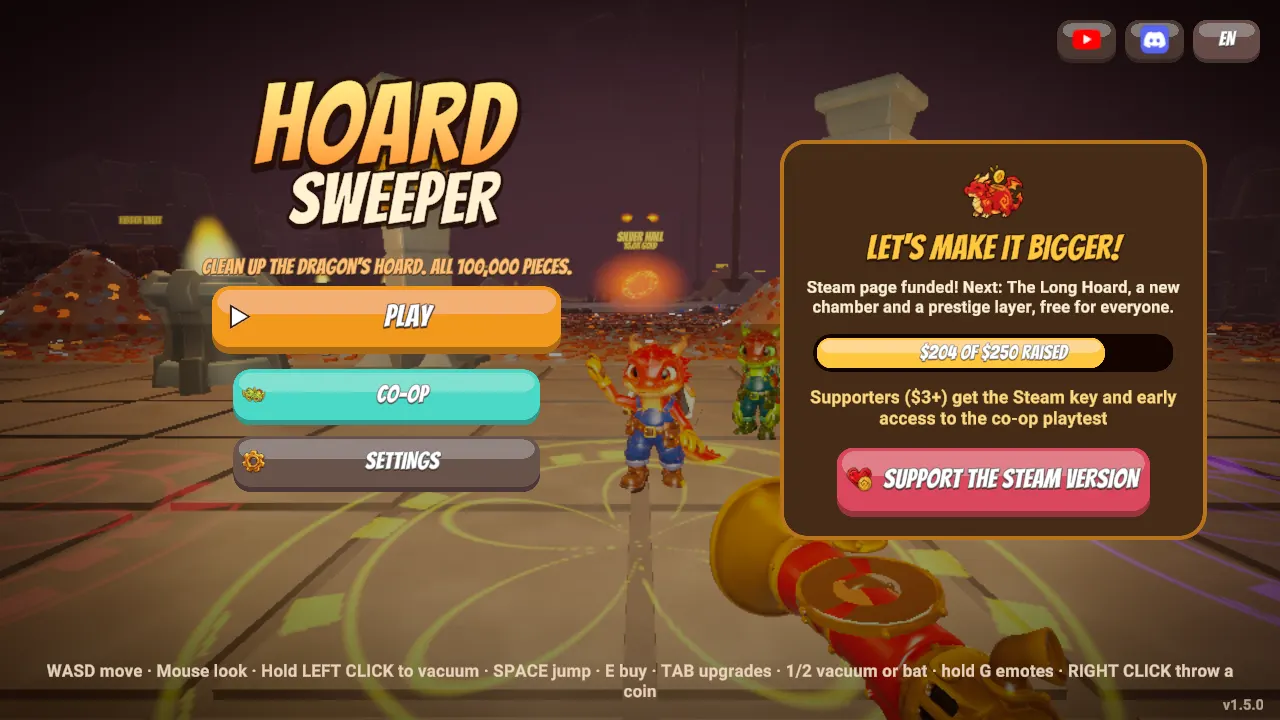
What are you seeing?
Find the line that matches your screen, then jump to the fix.
| What you see | What it usually means | What to do |
|---|---|---|
| The gold bar under the HOARD SWEEPER logo is still moving | The game files are still downloading | Wait, and don't reload halfway; a faster connection helps |
| The bar has stopped for several minutes | The download stalled or the game is stuck starting up | Hard refresh (step 1) and close other heavy tabs (step 6) |
| "Your browser could not start the game. Please update your browser, enable hardware acceleration and reload the page." | The browser could not start WebGL 2, or lost its graphics context | Steps 2 to 4 |
| An itch.io screen saying "You should be using itch.io" | itch.io could not confirm which website the game is embedded on | See the itch.io section below |
| A black or empty game area after pressing Play | Graphics are off, an extension interferes, or a school/work firewall blocks itch.io | Steps 4, 5 and the school/work section below |
7 steps to fix Hoard Sweeper not loading
- Hard refresh the page. Press Ctrl + Shift + R on Windows or Cmd + Shift + R on a Mac, then press Play again.
- Update your browser. Use a current version of Chrome, Edge, Firefox or Safari. Safari supports WebGL 2 from version 15, so an older iPhone or Mac that can't update that far won't run the game.
- Turn on hardware acceleration and restart the browser.
- Chrome: Settings, then System, then switch on "Use graphics acceleration when available", and relaunch.
- Edge: Settings, then System and performance, then switch on "Use hardware acceleration when available", and restart.
- Firefox: Settings, then General, then Performance. Untick "Use recommended performance settings", tick "Use hardware acceleration when available", and restart.
- Test WebGL 2. Open get.webgl.org/webgl2. A spinning cube means your browser can draw the game. If it says WebGL 2 is unavailable, update your graphics driver on Windows, or update the operating system on a Mac or iPhone. In Chrome or Edge,
chrome://gpuoredge://gpushould list WebGL2 as hardware accelerated. - Try a private window. If Hoard Sweeper loads in a private or incognito window, an extension or stored data in your normal window is the cause. Turn extensions off one at a time to find it. Progress you make in a private window is not kept after you close it.
- Free up memory. Close other tabs and, on a phone or tablet, background apps. Hoard Sweeper is a full 3D game and needs more memory than a simple 2D one.
- Try another browser or the official page. If nothing else works, try a second browser, or play on the official Hoard Sweeper page on itch.io.
Blocked on a school or work network (Chromebook)
Hoard Sweeper needs no download or account, but no download does not guarantee unblocked access. On managed school Chromebooks or office Wi-Fi, two network restrictions commonly stop the game from loading:
- Firewall blocking
itch.iooritch.zone: Even ifhoardsweeperfan.comopens, the embedded build streams from itch.io's servers. If your network blocks gaming domains, the player area stays blank or hangs at 0%. - Managed policy disabling WebGL or hardware acceleration: Some school Chromebooks turn off 3D graphics acceleration by policy, which triggers the "Your browser could not start the game" message.
If the game fails on both this page and itch.io while on school/work Wi-Fi, test on a personal phone connection to confirm it is a network block rather than a broken browser.
"Your browser could not start the game"
This is Hoard Sweeper's own error message. The game shows it when the browser cannot create a WebGL 2 graphics context, or when that context is lost while the game is running. It is not a problem with your save or your internet connection. Update the browser (step 2), switch on hardware acceleration and restart (step 3), then confirm WebGL 2 works (step 4) and reload the page.
"You should be using itch.io" instead of the game
The game on this site is embedded through itch.io's official embed. itch.io checks which website the game is shown on, and if it can't tell, it shows a "You should be using itch.io" page instead of the game. That usually happens when a privacy, tracking or referrer-blocking extension hides the page address from the embedded frame. Allow hoardsweeperfan.com in that extension, or pause it for this site, and reload. If you'd rather not change your extension, play on the official itch.io page.
What you need to run Hoard Sweeper
- A current browser with WebGL 2: Chrome, Edge, Firefox, or Safari 15 or later.
- Hardware acceleration switched on.
- Room for a large first download. An older note said about 88 MB; we have not remeasured the current files.
- Keyboard and mouse, a touchscreen, or a controller. On phones and tablets, play in landscape.
Don't clear all your browsing data
Your Hoard Sweeper save lives in your browser's site storage, so deleting cookies and site data for this site or for itch.io can erase your progress. If you need to clear something, clear only "Cached images and files". Saves are also kept separately for each website: progress from itch.io or another site will not appear on hoardsweeperfan.com, and the other way round. Read more in our Hoard Sweeper FAQ.
If Hoard Sweeper runs slowly
Open Settings from the title screen. Under Screen you can lower Graphics, switch Fullscreen and pick your language; under Sound & Controls you can adjust mouse sensitivity and field of view, and Controls shows the full key and controller map. Since update 1.4 the Graphics setting goes from Low to Ultra. A lower graphics setting, fewer open tabs and the Fullscreen button under the player all help on older laptops and phones. For the controls themselves, see how to play Hoard Sweeper.
Still stuck?
If the game also fails on the official itch.io page, the problem is with your browser or device, or with the game build itself; in-game bugs are best reported to the developer, Jungle Pixel Studio, on the Hoard Sweeper itch.io page. If it works there but not here, tell us which browser and device you use and what you see, and we'll look into it.
Once the game is running, the tips guide covers levers and the free floors. Co-op is not in this browser embed; the co-op guide says where it works.
Sources: loading steps from our earlier tests of the embedded build, and the floor limit from update 1.6. Checked 24 November 2026. The 88 MB figure is an older note, not a new measurement.
Hoard Sweeper loading FAQ
Why is Hoard Sweeper stuck on the loading screen?
Usually the first download is still running, or the browser cannot start WebGL 2. Wait while the gold bar moves; if it stops, hard refresh, update the browser, turn on hardware acceleration and test WebGL 2 at get.webgl.org/webgl2. An older copy of this page said about 88 MB. We have not remeasured the current browser files.
What does "Your browser could not start the game" mean?
It is Hoard Sweeper's own message for when the browser cannot create a WebGL 2 graphics context or loses it. Update the browser, switch on hardware acceleration, restart it and reload the page.
Why do I see "You should be using itch.io" instead of Hoard Sweeper?
itch.io shows that page when it cannot confirm which website the game is embedded on, usually because a privacy or referrer-blocking extension hides the page address. Allow hoardsweeperfan.com in the extension and reload, or play on the official itch.io page.
Is Hoard Sweeper unblocked on school Chromebooks or work Wi-Fi?
No download is needed, so it works on Chromebooks that support WebGL 2, but it still depends on your school or work firewall allowing both hoardsweeperfan.com and the embedded itch.io build. If a firewall blocks itch.io or disables WebGL, the player will stay blank or fail to start.
How big is the Hoard Sweeper download?
A full 3D build, so the first visit can take a minute or more. Later visits are usually faster because the browser caches the files. We have not remeasured the 1.7.2 files. An older note here said about 88 MB, and the update 1.5 devlog listed a 46 MB web zip.
Does Hoard Sweeper work on iPhone and iPad?
Yes, in Safari 15 or later, which supports WebGL 2. Older devices that cannot update to Safari 15 will not run it. Play in landscape and close background apps.
Will clearing my browser data delete my Hoard Sweeper save?
It can. Deleting cookies and site data for this site or for itch.io can erase your progress. Clear only "Cached images and files" if you need to clear something.
Why doesn't my itch.io progress show up here?
Browsers keep an embedded game's save separately for each website, so progress made on itch.io or another site stays there and does not appear on hoardsweeperfan.com.
Hoard Sweeper is laggy. What can I change?
Open Settings from the title screen and lower Graphics, close other tabs and apps, and use the Fullscreen button.