
Hoard Sweeper Beginner Guide: First 10 Minutes
Last updated: November 28, 2026 · By the Hoard Sweeper fan site · Game by Jungle Pixel Studio
Your first goal: collect treasure, stand on the matching glowing vault circle, spend the gold, and clear the main pile until a lever appears. Press E to pull it. Start in Copper Cave; the free browser build includes Floors 1–3. All six floors are available in the Windows Supporter Pack or in the browser with its Supporter code.
| Time | Focus | Result to look for |
|---|---|---|
| 0–2 minutes | Move, look and vacuum | Treasure enters your tank |
| 2–4 minutes | Find a matching vault circle | Your collected treasure is sorted |
| 4–7 minutes | Open Tab and inspect upgrades |
Choose a useful first improvement |
| 7–10 minutes | Return to the main pile and nearby edges | Work toward exposing the floor lever |
These are orientation targets, not a required speedrun. The homepage launches the free browser build; the wiki is the reference index if you need to look up an unfamiliar object.
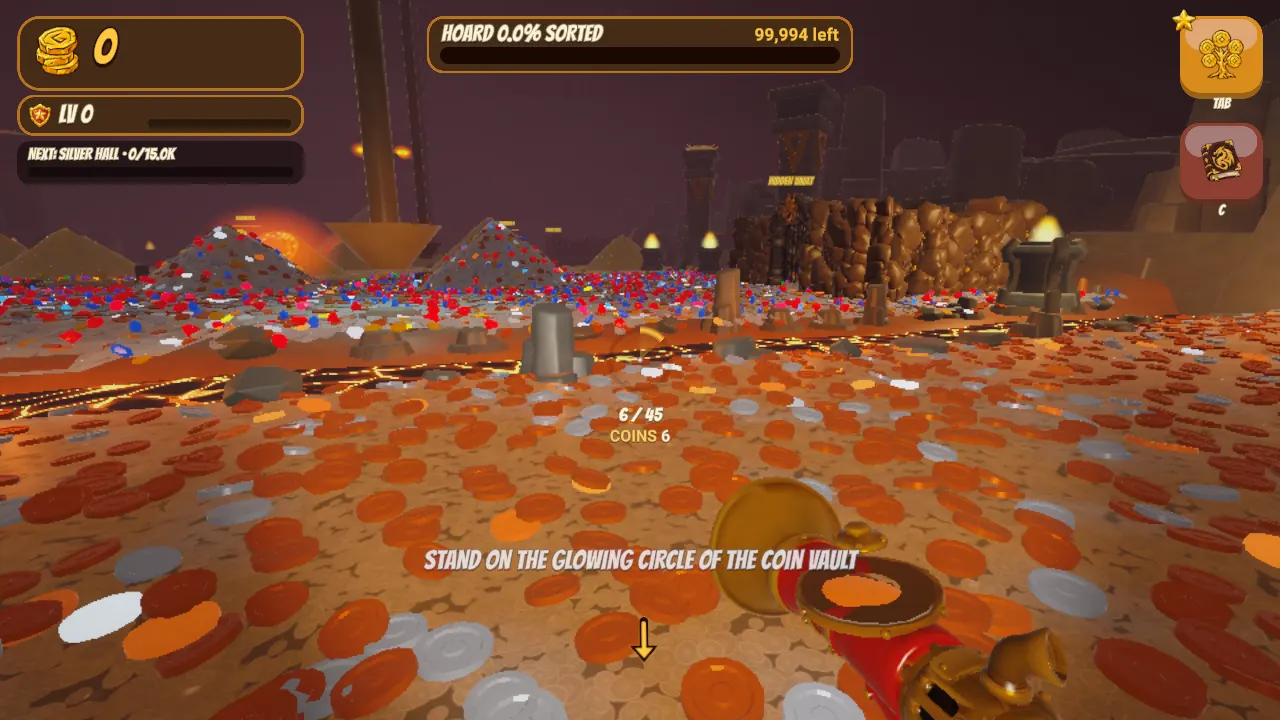
Minutes 0–2: find your bearings
Press Play on the homepage and wait for the 3D files to load. Click inside the player to capture the mouse. Move using WASD or the arrow keys and look around with the mouse. On a touchscreen, use the movement control at the left, drag to look, and hold the fan button or use AUTO. A landscape orientation makes the cave easier to see.
You are a kobold cleaning a dragon's collection. Hold left click to draw loose treasure toward the vacuum. Copper, silver and gold coins mingle with gems and other valuables, so turn toward a pile and watch the tank fill. You do not have to memorize the whole upgrade tree before you start moving.
Minutes 2–4: make your first deposit
Look for the vault that matches what you collected, then stand on its glowing circle to sort. A vault is a destination for unloading treasure, not a floor exit. If you are not sure where to go next, return to the collection area and compare the treasure in your tank with the vaults around you.
Deposit regularly while learning the room. This creates a repeatable route from the hoard to the vault and back, and makes it easier to notice which part of the trip feels slow. You can adjust that route as you learn where the circles are; exact timing is not a requirement.
Minutes 4–7: inspect both upgrade trees
Press Tab to open the upgrade screen. The game describes more than 40 upgrades across your kobold and the team. Look at the costs and descriptions before buying. The kobold side uses skill points and the team side uses gold, according to the earlier skill-tree notes.
For a practical first choice, compare suction and capacity: faster suction helps gather treasure, while a larger tank can reduce repeated deposit trips. Movement improvements can help if travel takes most of your attention. You do not need a perfect build. The upgrade priority guide discusses options without treating historical percentages as current guarantees.
Minutes 7–10: clear toward the lever
Return to the main pile and continue the cycle. As the center opens up, inspect the edges for remaining objects and cracked walls. Switch to the bat with 2 and swing at a visibly cracked wall when you are ready to investigate; hidden vaults are a separate reward from ordinary floor progression.
The 1.6 route to the next floor is the lever uncovered after the main hoard is cleared. Approach it and press E. Your exact clearing time depends on upgrades and how you play, so finding it within ten minutes is not promised. Repeat the same broad sequence on subsequent accessible floors.
The practical loop after the opening
- Vacuum loose treasure from the largest pile.
- Sort by stepping on the corresponding vault's glowing circle.
- Upgrade the bottleneck you notice in
Tab. - Sweep edges to catch objects you passed while exploring.
- Smash cracked walls with the bat to inspect hidden vaults.
- Pull the lever with
Eonce the main hoard has exposed it.
Press C to view the 24-slot relic museum. Only Golden Toilet and Legendary Dragon Egg are named in our verified notes; the other 22 names and locations should not be filled in by guesswork. Shiny coins are listed at x10; the golden mimic and gold rain are events to watch for. Older event percentages are historical, not promises for the rebuilt map.
Free floors and full access
The first three floors remain free in the browser. If the route stops at the Floor 3 boundary, the running game has reached its free limit. The Windows Supporter Pack is $5.99 or more on the developer's itch.io page and includes the complete six floors, online co-op, a golden vacuum, a Supporter code and a future Steam key at launch.
A pack owner can enter the Supporter code under Support on the browser main menu to open all six floors and the golden vacuum there. It does not add browser co-op. For the Windows room process, continue to the co-op setup guide.
Five common beginner mistakes in Update 1.6
- Treating the Floor 3 free cap as a loading bug. A game that runs but stops at the free boundary has a different issue from a blank player. Use not loading for startup failures.
- Searching for a paid lava bridge. The 15,000-gold bridge toll belongs to historical Update 1.4; 1.6 uses levers instead.
- Mixing up two codes. A Supporter code unlocks browser content; a six-letter room code joins online Windows co-op. They are not interchangeable.
- Clearing browser site data without thinking about the save. Progress is stored locally per website and may be erased when site data is deleted. Do not assume it will appear on itch.io or another device.
- Trusting an old wiki without its date. The old four-chamber map, bridge tolls and unconfirmed upgrade percentages may describe a different release. Compare claims against the updates timeline.
For a broader index use the wiki, and for specific upgrade or relic routes use tips. This is an unofficial fan site for the game by Jungle Pixel Studio (Enmanuel Gutierrez); the developer's official page is the place for official announcements.
Beginner guide FAQ
Where should a new player start?
Start in Copper Cave, vacuum treasure and deposit it at the matching glowing vault circle.
Which key opens the upgrade screen?
Press Tab to inspect the kobold and team upgrade trees.
How do I get past a floor?
Clear its main hoard, approach the uncovered lever and press E; free browser access ends after Floor 3.
Does the Supporter code enable browser co-op?
No. It unlocks all six floors and the golden vacuum in the browser; Windows co-op uses a separate room code.
Can clearing site data remove my save?
Yes. Browser progress is stored locally per website and clearing site data can erase it.